DNS propagation refers to the process of updating DNS records across global DNS servers whenever new records are published or old ones are modified.
Naturally, such a process takes a significant amount of time, called the propagation delay. Understanding why this delay occurs and how it can affect website/domain resolution is important for domain owners, SaaS providers, and website administrators.
Why?
New DNS records need to be published whenever:
- A website is migrated,
- The hosting provider has changed,
- A new email server is set up,
- A new website has been launched,
- A new subdomain is configured.
These are just some of the common scenarios among many others that require changes to DNS records.
So, whenever such situations occur, new records must be published, and DNS propagation must occur. That means there will be some downtime for the website due to the propagation delay. Learning how to manage that and avoiding confusion is necessary.
That’s why in this article, we will learn about DNS propagation in detail, as well as how to track it and work around it. But first, let's start with what DNS propagation is.
What Is DNS Propagation?
DNS propagation is the time it takes for a domain’s new DNS records to propagate across all global DNS servers. DNS propagation occurs whenever a domain admin publishes new DNS records or updates old ones. The records are communicated across the DNS hierarchy, and that communication takes some time. Let’s look at an analogy to understand why propagation takes time.
Since DNS is often explained using the analogy of a phonebook, we will expand on propagation using the same example. Think of DNS propagation like changing your phone number. After changing your number, you must individually call or message each contact to inform them of the change. Otherwise, they will keep calling the old number and be unable to reach you. Of course, in the modern world, there are far more efficient ways of doing this, but for explaining DNS propagation, it is a good analogy.
So, how does that translate to DNS propagation? Well, your nameservers can be considered “You”, your DNS records are “Your Number”, and the entirety of the global DNS servers are “Your Contacts”.
So, DNS propagation refers to how the records are sent from the original nameservers to the rest of the DNS servers and resolvers, and how long it takes for them to cache the new records.
What Are The Factors That Affect DNS Propagation?
The speed at which DNS propagation occurs is affected by several factors. The most important ones include the following.
- Time to Live (TTL). TTL defines how long a DNS record should be kept in a DNS resolver’s cache. Longer TTLs mean that a record will be stored for a long time, while shorter TTLs imply the opposite. With a shorter TTL, DNS propagation is faster, but DNS traffic is also increased.
- ISP and Registrar Caches. ISPs and domain registrars also cache DNS records. They can withhold records based on their timer regardless of the set TTL. This can cause additional delays.
- Nameserver Syncing. When a domain provider is switched completely, new nameservers must be updated with the domain records. This process can take far longer than the updating of individual records.
Now that we understand propagation delays and the factors that affect them, let’s look into why propagation delays matter so much.
Why DNS Propagation Time Matters?
DNS propagation time matters because until updates spread across the internet, users and services may still rely on outdated records. This can lead to website errors, email misrouting, or failed verifications.
Here are some common scenarios in which DNS propagation delays can hamper services and websites.
- Website migration. A common issue with website migration is that during DNS propagation, users may be routed to the old server because their resolver hasn’t gotten the updated records. Since the old server no longer has the website content, the user will be hit with a “website not available” error.
- Email service updates. DNS MX records control where emails are routed when sent to a domain. Mail may be misrouted if updated MX records haven't fully propagated.
- Domain redirection. A redirect may not work correctly if cached records point to outdated destinations.
- Verification step. TXT or CNAME records used for domain verification may fail if they have not been updated globally.
So web masters and domain administrators have to account for these issues when updating DNS records. If they don’t do that, then it can cause problems such as the following:
- Confusing diagnostics during website issues.
- Premature changes to site configurations.
- User complaints about accessibility or inconsistent behavior.
That last one is particularly detrimental as it can affect the consumer’s trust in your brand and hamper your SEO efforts as well.
How Long Does DNS Propagation Take?
DNS propagation typically takes 24-48 hours, but can sometimes take up to 72 hours. So there is no set answer.
The reasons for the different timing are numerous. Discussing all of them would take too long, so we have created a table of the most common reasons.
|
Factor |
Impact |
|
TTL Settings |
Lower TTLs enable faster updates; higher TTLs result in longer caching. |
|
Type of Change |
Nameserver changes often take longer than updating A, CNAME, or TXT records. |
|
ISP and Device Caching |
Local and regional resolvers may refresh at different intervals. |
|
Registrar/DNS Provider |
Some registrars apply updates to varying speeds than others. |
|
Distance Required to Propagate |
The physical distance that needs to be traversed for the records to reach the next server in the hierarchy has a direct effect on the propagation time. |
|
Technical Issues |
If there are any technical issues in the DNS structure, such as offline servers or broken connections, then record propagation can take even longer than usual. |
A combination of these factors results in the variable propagation time that we mentioned before (30 minutes to 72 hours).
How to Check DNS Propagation Status?
To stay ahead of DNS propagation delays, you must learn how long it takes for your records to update. To do that, you need a method to check the propagation status.
There are multiple methods of doing so. They vary based on what platform and resources you are using. Given below are some of the standard techniques of checking DNS propagation status.
1. Online DNS Propagation Checker Tools
There are web-based tools that you can use to check the propagation status of your domain’s records. You need not look further than our very own dnschecker.org tool.
To use it, follow these simple steps.
(i) Enter the domain name.
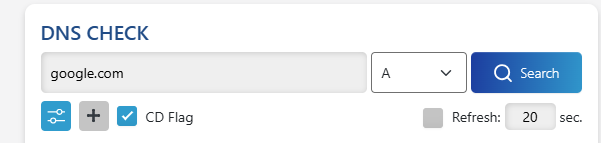
(ii) Select the record type.
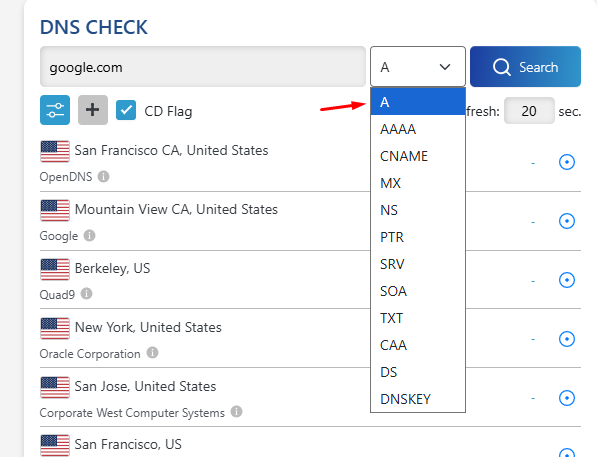
(iii) Click/tap the “Search” button.
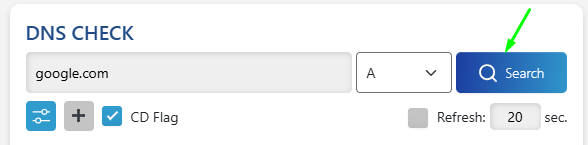
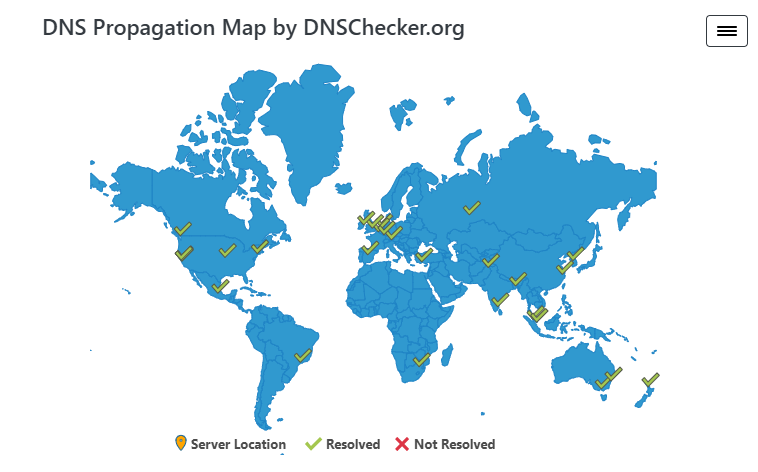
After that, the propagation map and list will update and show whether your records are resolved on the global DNS servers or not. If any servers haven’t updated the records, a red “X” will appear on top to signify it.
Additionally, you can click on the “+” sign below the input field for the domain name to add the details of a custom DNS server to check it for updates. This is useful for checking if specific servers are resolving your domain.
2. Linux Terminal
If you are tech-savvy, then you can do a DNS record propagation check with some terminal commands in almost any Linux distro. That’s because they all have “dig” by default. Here’s how you can use that to check whether a domain’s records have propagated or not.
- Open the terminal with “CTRL+ALT+T”
- In the terminal, enter this command: “dig yourdomain.com” to check if the domain resolves or not.
- To check for specific records, use this command instead.
“dig yourdomain.com MX”. You can replace MX with any other record. - To check specific DNS providers and their servers, use this command:
“ dig @8.8.8.8 yourdomain.com MX” where 8.8.8.8 is the Google DNS. You can replace it with the DNS provider you want to check, e.g., 1.1.1.1 (Cloudflare).
You might have to install Dig if your distro doesn’t already have it. The command for that is “sudo apt update” and then “sudo apt install dnsutils.” This will install all DNS-related utilities, including dig and nslookup.
3. macOS Terminal
macOS and Linux share the same tools for checking DNS propagation. So, you can use the same commands. The only difference is that your method of opening the terminal will be “cmd+space” and then typing “Terminal” to open it.
Then you can use the same commands as Linux to do a lookup.
4. Windows Command Prompt
In Windows 10 and 11, you can open the command prompt by pressing “CTRL + R” and then typing “cmd” and hitting enter.
In the command prompt, you can use nslookup to check for DNS propagation. Here are the exact commands you can use.
- For a basic check, enter the following command:
“nslookup yourdomain.com” - To check a specific DNS server or provider, use the following command:
“nslookup yourdomain.com 1.1.1.1”
Where 1.1.1.1 is Cloudflare’s DNS.
Why You Should Use a DNS Propagation Checker
As you can see, OS tools are not as effective as online tools for performing propagation checks. They provide fundamental information and are harder to use. So, it's better to just default to online tools.
When troubleshooting propagation, DNS record lookup tools provide real-time information on what DNS value your domain is returning from a given resolver. They also let you query a specific record type and nameserver directly.
The map feature, which shows the physical servers and whether they have been updated or not, is handy for troubleshooting.
Whether you're waiting for a new “A record” to reflect or verifying “TXT records” for domain ownership, you can see the live data without having to jump through any technical hoops.
The best thing is that our very own propagation check is completely free to use. It provides all of the features that one would need, and there are no charges.
OS tools can also provide the wrong results if the device’s local cache is not cleared. So, online tools are the clear winner here.
Best Practices to Manage DNS Propagation Issues
DNS propagation can be easily managed with a bit of foresight and patience. The trick is to plan for it instead of trying to do it on the fly. Here are a couple of tricks you can use to make propagation easier and more consistent.
What To Do
1. Lower the TTL to 24–48 hours in advance.
As you know, the TTL defines how long a DNS record is retained in a DNS resolver. The TTL is provided in seconds, and it can range from a few minutes to a few hours.
Now, resolvers won’t look for updated records as long as the old records exist within the limit defined by their TTL. So, to speed up the propagation of new records, you can set the TTL to a lower value, for example, 300 seconds (5 minutes).
Do this 2 or 3 days in advance before making a significant change. This will ensure that resolvers pick up the new records quickly and reduce the propagation delay.
2. Schedule changes during off-peak hours
To minimize the impact on users, push updates during off-peak hours, such as late night or early morning.
You can use automatic schedulers to push the changes at such hours without being present yourself.
3. Duplicate DNS records before changing nameservers
If you're migrating to a new DNS provider or host, ensure that all critical records (A, MX, TXT, CNAME) are replicated at the new provider before switching nameservers. This prevents service disruptions, such as bounced emails or inaccessible websites, during the propagation window.
What Not To Do
1. Don’t panic and make repeated changes.
Every time you change a record, the propagation timer resets. Frequent edits can lead to longer delays and inconsistent resolution across the internet.
So don’t be alarmed if your changes do not apply in real-time, and be patient.
2. Avoid testing from a single network.
DNS caching may vary by location. To get an accurate picture of propagation, check from multiple devices, networks, or use global DNS checking tools. Don’t rely solely on your browser or ISP for confirmation.
Final Thoughts
DNS propagation is an inescapable part of managing a domain or website. It tends to be misunderstood, leading to confusion. By learning about it and planning around it, you can minimize downtime and disruptions caused by necessary updates.